# C/S Fulfillment Actions

You can perform all fulfillment actions directly from the customer’s profile.

* [Cancel Fulfillment](#c-sfulfillmentactions-cancelfulfillment)
* [Issue RMA](#c-sfulfillmentactions-issuerma)
* [Reship Fulfillment](#c-sfulfillmentactions-reshipfulfillment)
* [Batch Updates](#c-sfulfillmentactions-batchupdates)

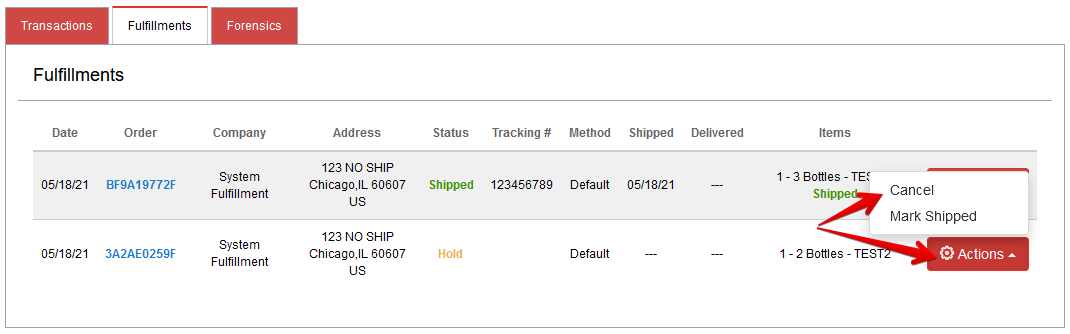
[Navigate to the customer’s profile](https://help.konnektive.com/konnektive-crm/customer-service/locating-a-customer-record) then scroll down to their Transactions/Fulfillments section. Click the Fulfillments tab to view the customer’s fulfillment records.

***

## Cancel Fulfillment <a href="#c-sfulfillmentactions-cancelfulfillment" id="c-sfulfillmentactions-cancelfulfillment"></a>

<figure><img src="https://1103784913-files.gitbook.io/~/files/v0/b/gitbook-x-prod.appspot.com/o/spaces%2FiAC0G99SjXjSv2GM5PAE%2Fuploads%2Fev08GLSGoFrhUk2wTipv%2Fimage.png?alt=media&#x26;token=1f16cd3f-1e28-4a43-8de6-0add92aec6dc" alt="" width="563"><figcaption></figcaption></figure>

Choose items to cancel:

<figure><img src="https://1103784913-files.gitbook.io/~/files/v0/b/gitbook-x-prod.appspot.com/o/spaces%2FiAC0G99SjXjSv2GM5PAE%2Fuploads%2F8vNB5pkg2VAFNc2ERmLw%2Fimage.png?alt=media&#x26;token=fbc48696-5f48-4b61-a1d2-a1eb407486d6" alt="" width="449"><figcaption></figcaption></figure>

***

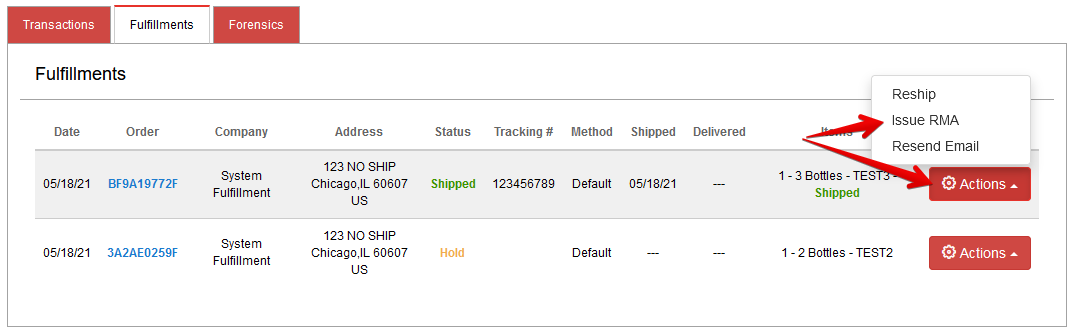
## Issue RMA <a href="#c-sfulfillmentactions-issuerma" id="c-sfulfillmentactions-issuerma"></a>

<figure><img src="https://1103784913-files.gitbook.io/~/files/v0/b/gitbook-x-prod.appspot.com/o/spaces%2FiAC0G99SjXjSv2GM5PAE%2Fuploads%2FRZ7LIjBjnq2erC1rgKmH%2Fimage.png?alt=media&#x26;token=10567e5c-dc62-4df8-881e-f905ad440a7c" alt="" width="563"><figcaption></figcaption></figure>

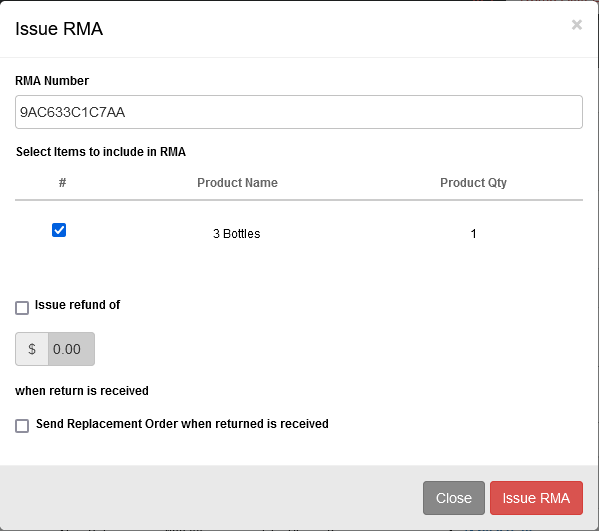
Choose items to include in the RMA. Also select if a refund should be issued upon return and if a replacement should be sent out.

<figure><img src="https://1103784913-files.gitbook.io/~/files/v0/b/gitbook-x-prod.appspot.com/o/spaces%2FiAC0G99SjXjSv2GM5PAE%2Fuploads%2FtaJLYjl8OwOx90DJvo7q%2Fimage.png?alt=media&#x26;token=1ac13b2b-0730-44b3-8696-001e131ff383" alt="" width="449"><figcaption></figcaption></figure>

***

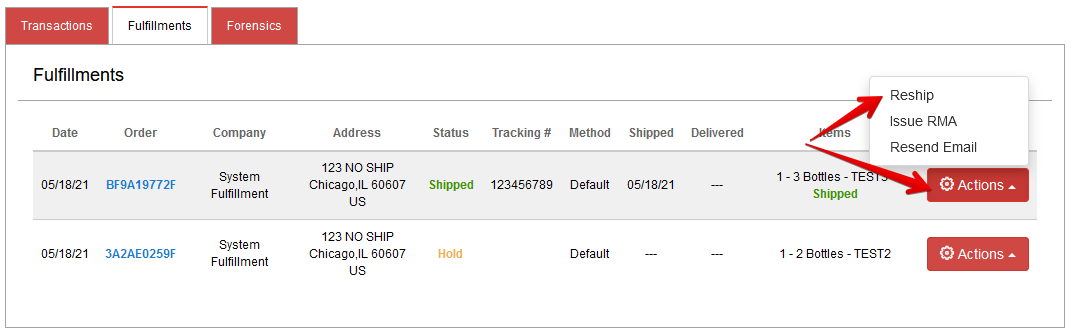
## Reship Fulfillment <a href="#c-sfulfillmentactions-reshipfulfillment" id="c-sfulfillmentactions-reshipfulfillment"></a>

<figure><img src="https://1103784913-files.gitbook.io/~/files/v0/b/gitbook-x-prod.appspot.com/o/spaces%2FiAC0G99SjXjSv2GM5PAE%2Fuploads%2FFyGoY87JGW4P28TwQrnd%2Fimage.png?alt=media&#x26;token=dc9924aa-b6c5-48c9-a507-e1e246835349" alt="" width="563"><figcaption></figcaption></figure>

Choose which items should be reshipped.

<figure><img src="https://1103784913-files.gitbook.io/~/files/v0/b/gitbook-x-prod.appspot.com/o/spaces%2FiAC0G99SjXjSv2GM5PAE%2Fuploads%2F1ZNmt0JEsFbjBUqaodhw%2Fimage.png?alt=media&#x26;token=81253518-45e9-4536-8bbc-ff1f85158065" alt="" width="449"><figcaption></figcaption></figure>

***

## Batch Updates <a href="#c-sfulfillmentactions-batchupdates" id="c-sfulfillmentactions-batchupdates"></a>

Please see our [Fulfillment Batch Update documentation.](https://help.konnektive.com/konnektive-crm/fulfillment/fulfillment-batch-update)