# FlexEcom

<figure><img src="https://1103784913-files.gitbook.io/~/files/v0/b/gitbook-x-prod.appspot.com/o/spaces%2FiAC0G99SjXjSv2GM5PAE%2Fuploads%2F7OfelogJSZQj3eQW4Xeb%2Fimage.png?alt=media&#x26;token=a2653065-3c97-468b-8175-d5e9aba55c6e" alt="" width="495"><figcaption></figcaption></figure>

{% hint style="info" %}
FlexEcom is for decline salvage only. Do not place a FlexEcom gateway on a campaign product or in ATRI gateway profiles.
{% endhint %}

{% hint style="info" %}
FlexEcom is available on Recycle Billing and when retrying initial declines.
{% endhint %}

{% hint style="info" %}
FlexEcom is available for cascades. Add the FlexEcom gateway to an ATRI cascade profile. Then set that cascade profile as a direct cascade on a gateway or as the cascade on an ATRI gateway profile.

Alternatively use the **cascadeAll** option on the FlexEcom gateway to cascade all initial sale soft declines to FlexEcom without the need to create cascade profiles.

Cascades return an instant approval or decline from FlexEcom. There is no wait period as there is with recycle billing or a retry on the Order Details report.
{% endhint %}

#### STEP 1

Go to Gateways > Gateway Integrations. Select FlexEcom. Press the green **+Activate** button.

<figure><img src="https://1103784913-files.gitbook.io/~/files/v0/b/gitbook-x-prod.appspot.com/o/spaces%2FiAC0G99SjXjSv2GM5PAE%2Fuploads%2FFm1NMmmWqJ87WDdFioxy%2Fimage.png?alt=media&#x26;token=d309f9c3-e263-42b3-8a82-6feac7bf8e2e" alt="" width="375"><figcaption></figcaption></figure>

#### STEP 2

Obtain **publicKey, secretKey,** and **signingSecret** from FlexEcom. Enter them here.

Choose to cascade all initial sale soft-declines to FlexEcom.  The **cascadeAll** option overrides all existing cascade profiles.

<figure><img src="https://1103784913-files.gitbook.io/~/files/v0/b/gitbook-x-prod.appspot.com/o/spaces%2FiAC0G99SjXjSv2GM5PAE%2Fuploads%2FMquWfilOOWwDq75JlJNi%2Fimage.png?alt=media&#x26;token=b1ebeaed-889f-4a58-ba4d-89318968015a" alt="" width="375"><figcaption></figcaption></figure>

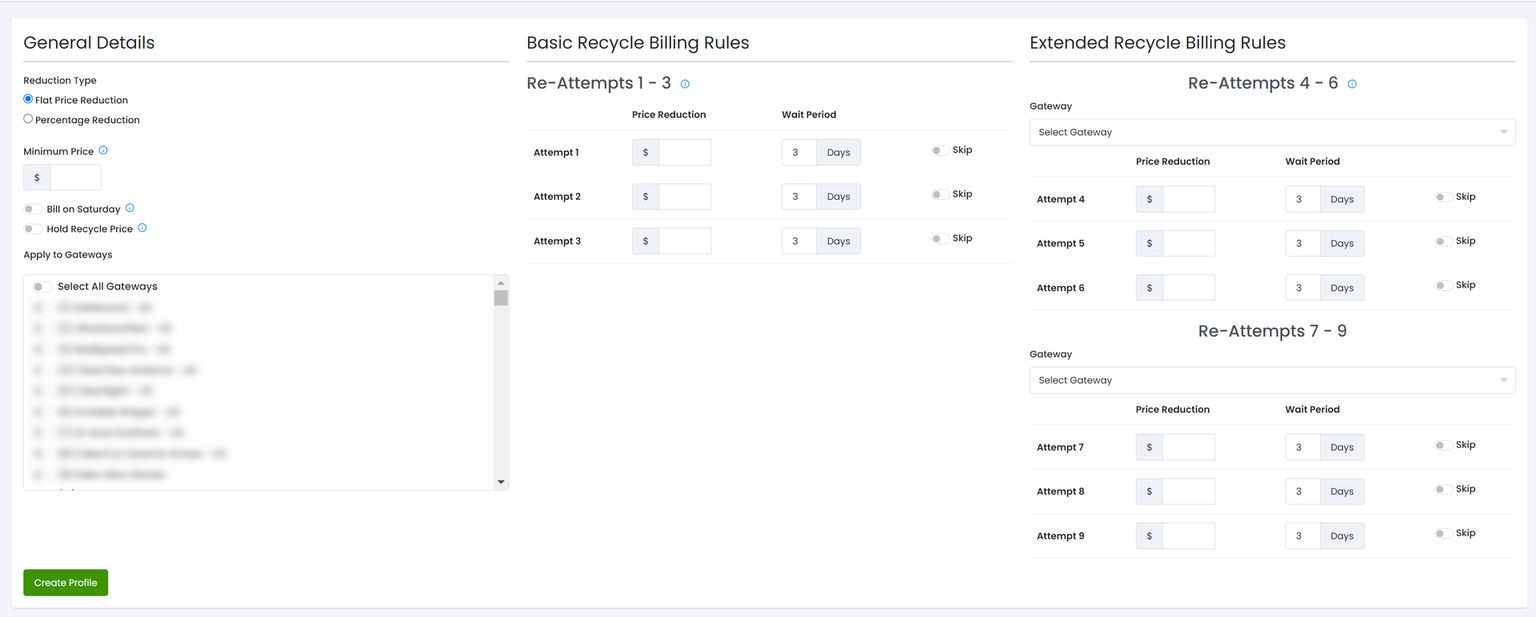
#### Recycle Billing

Go to Gateways > Recycle Billing

Select FlexEcom as the Gateway for Re-Attempts 4-6 or 7-9 or Final Attempt

<figure><img src="https://1103784913-files.gitbook.io/~/files/v0/b/gitbook-x-prod.appspot.com/o/spaces%2FiAC0G99SjXjSv2GM5PAE%2Fuploads%2FpE6cTayZDXg1hQMnrngU%2Fimage.png?alt=media&#x26;token=7801bb08-a5a1-4985-a808-fdb2d228ce7a" alt="" width="563"><figcaption></figcaption></figure>

#### Rerun Initial Declines

Choose the FlexEcom gateway directly when retrying initial declines on the Order Details Report or via the [Rerun Declined Sale API](https://apidocs.konnektive.com/#34638ede-05ec-4f95-8a8d-afd84a28475b). Do NOT retry on an ATRI gateway profile.

Initial Declines (new sales) with recurring products may be sent to FlexEcom. However a successful recovery leaves no payment token to rebill the subscription on the original decline gateway. The next rebill will attempt on the original decline gateway with card number and without cvv. If and when that declines then that can be sent to FlexEcom again through Recycle Billing.

Only Initial Declines are eligible to be re-run via FlexEcom. Re-running Declined Upsales is not supported.

#### FlexEcom Responses

Orders sent to FlexEcom are automatically retried by FlexEcom. The result from FlexEcom is communicated back to CRM.

<table><thead><tr><th width="193">Order Type</th><th width="167">Result</th><th>Action</th></tr></thead><tbody><tr><td>New Sale</td><td>Success</td><td>Order is Complete and fulfillments are processed</td></tr><tr><td>New Sale</td><td>Failure</td><td>Order is Declined. The exception to this is completing a trial. Completing a trial leaves the order status unchanged.</td></tr><tr><td>Recurring</td><td>Success</td><td>Move subscription to the next billing cycle. Fulfillments are processed. Subscription reverts to the previous declined gateway for next scheduled billing.</td></tr><tr><td>Recurring</td><td>Failure</td><td>Subscription is Recycle Failed</td></tr></tbody></table>

#### Send Hard Declines to FlexEcom

By default only Soft Declines are sent to FlexEcom.  This can be overridden using [Decline Mapping](https://help.konnektive.com/konnektive-crm/gateway-setup/decline-message-mapping).  Map any specific Hard Decline to a Soft Decline.
