> For the complete documentation index, see [llms.txt](https://help.konnektive.com/llms.txt). Markdown versions of documentation pages are available by appending `.md` to page URLs; this page is available as [Markdown](https://help.konnektive.com/konnektive-crm/reports/continuity-report.md).
# Continuity Report
The Continuity Report can be found under Reports|Sales|Continuity:
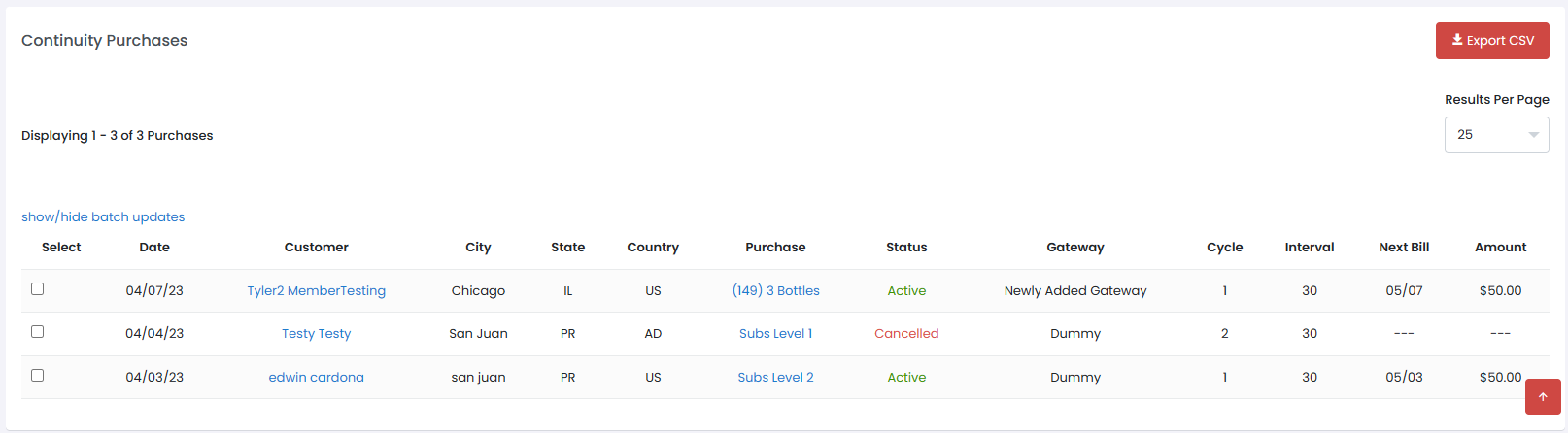
This report gives you full visibility into your continuity purchases and recurring schedules. You can use this report to view report data and to make changes to rebill schedules.
* The **Date Range Type** filter will determine which Date value is used when evaluating the date range for continuity purchases:
* **Date Created :** The date on which the Recurring Purchase was first created. This is usually the same date that the cycle 1 billing occurred on.
* **Next Bill Date :** The date of the next scheduled billing cycle for a Recurring Purchase. This can be useful for viewing a breakdown of all the currently-existing subscriptions that will rebill within a certain timeframe.
* **Cancel Date :** The most recent date on which the Recurring Purchase was cancelled. Recurring Purchases that have never been cancelled will not have a value saved for this date, and will usually not appear when using this date range type (Reactivations can interfere).
* **Last Decline Date :** The most recent date on which a Recurring Purchase ran into a Transaction Decline during a billing cycle. Those which have never been declined will not appear.
* You can also filter your results by any of the other available filters
The graph shows your Trial, Active, Recycle, Cancelled, and Recycle Failed customers within your chosen date range\
**Continuity Report Details**
* **Date** : The date the continuity was purchased
* **Customer** : Name of continuity customer
* **City** : City of Customer billing address
* **State** : State of Customer billing address
* **Country** : Country of Customer billing address
* **Purchase** : Title of recurring purchase
* **Status** : Status of the recurring Purchase
* **Gateway : Gateway for the next billing Cycle**
* **Cycle : The Cycle of the Recurring purchase**
* **Interval : The number of days between transactions**
* **Next Bill** : Billing date of the Next Recurring Purchase Cycle
* **Amount** : Amount to be billed on the Next Bill Date